What KodeBuilder CRM is
Small sales teams often track deals in spreadsheets, chat threads and memory, and follow-ups slip when someone is out of the office. KodeBuilder CRM is CRM software for small business that keeps that work in one workspace: who the customer is, what is being sold, what stage the deal is at, what happened last and what needs doing next. Your team uses the same data at the desk and on the phone.
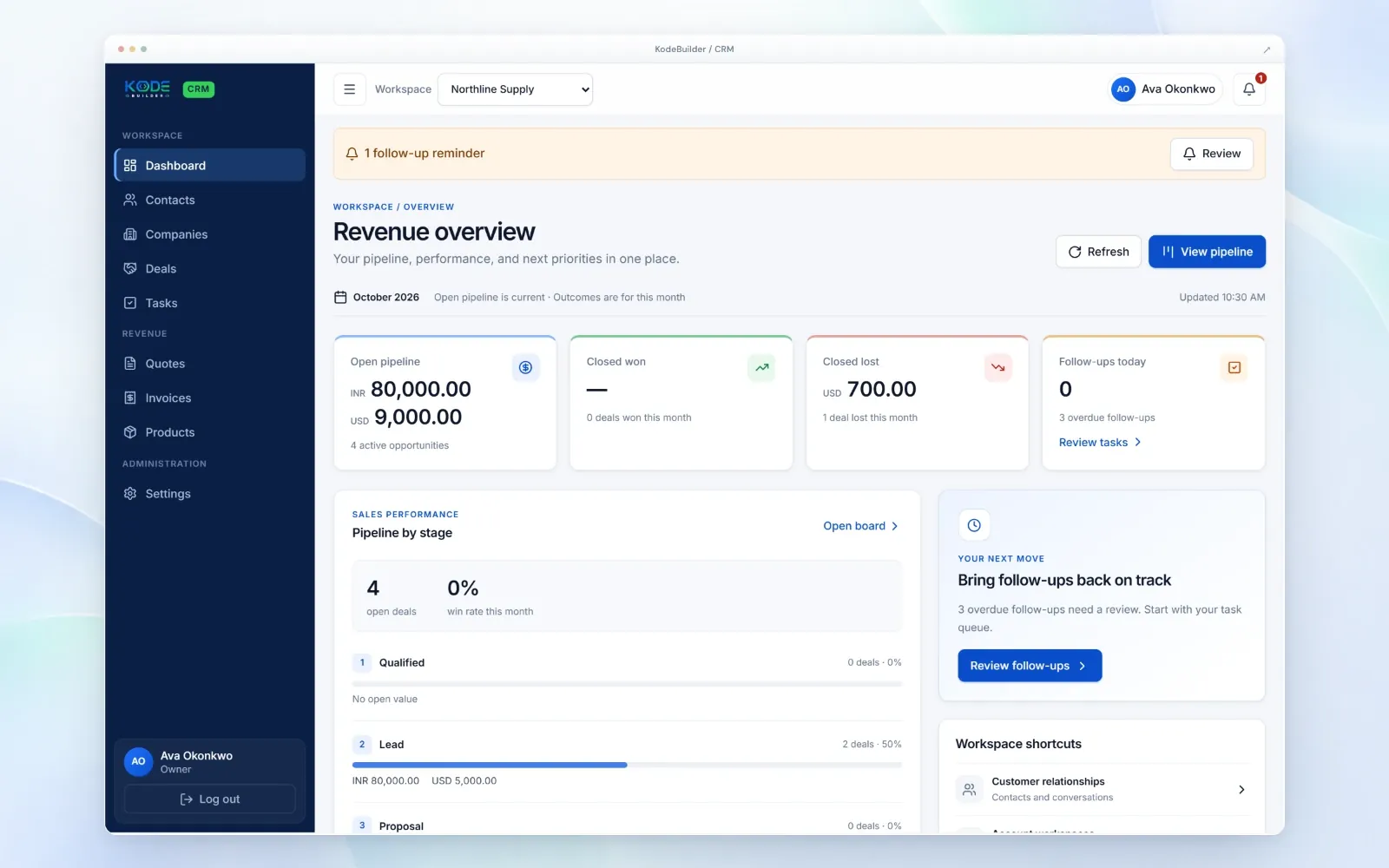
Revenue overview and follow-up reminders
The dashboard shows the open pipeline, deals closed won and closed lost this month, and the follow-ups due today, with a count of overdue follow-ups. Pipeline by stage shows open deals and the month's win rate. A reminder bar and a "your next move" panel send the team straight to the follow-ups that need attention, so a promised call back does not get forgotten.
Sales pipeline by stage
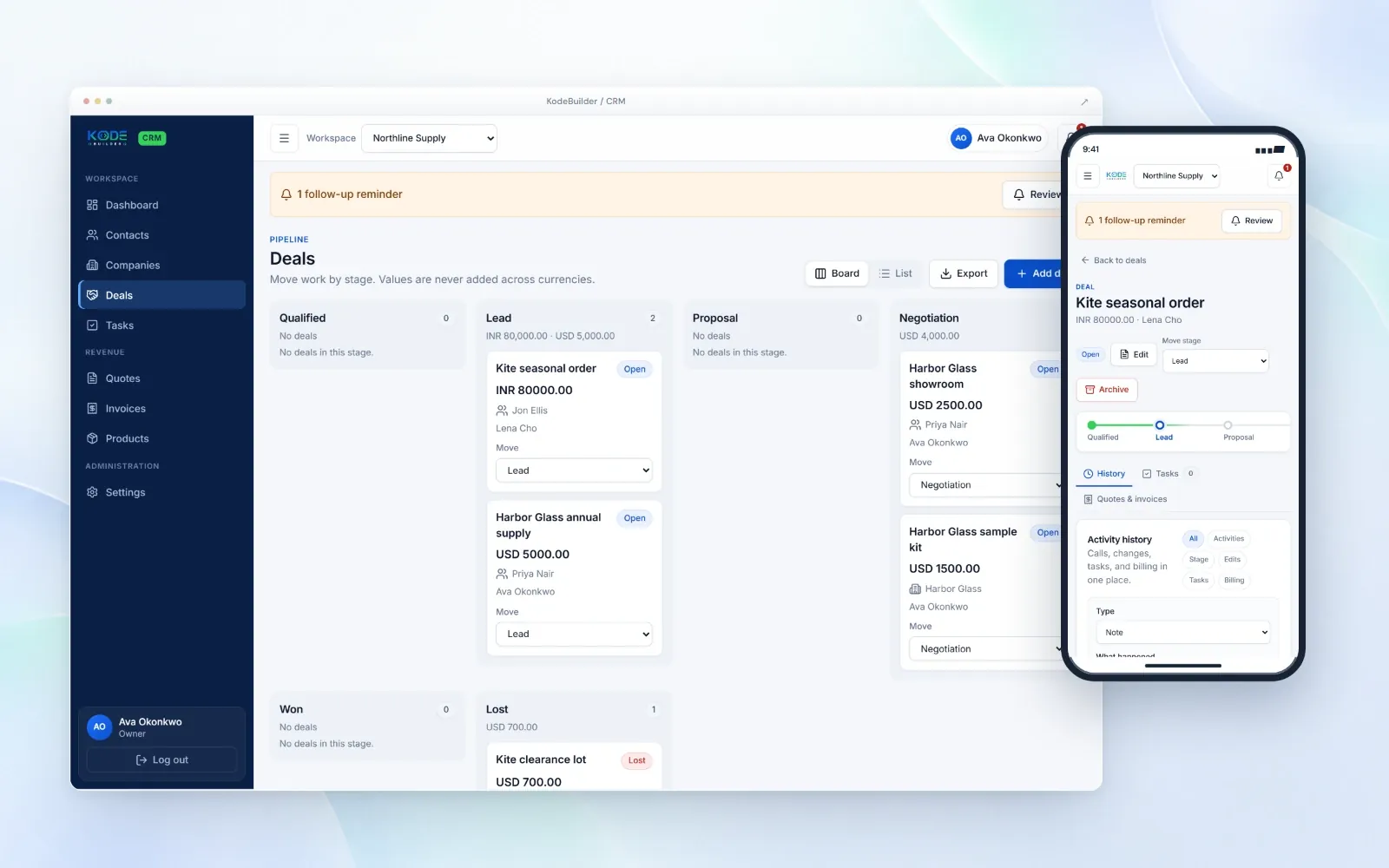
Deals move through six stages: Qualified, Lead, Proposal, Negotiation, Won and Lost. The pipeline opens as a board, with a card for each deal showing its value, contact and owner, or as a list. Moving a deal to the next stage takes one selection, and the pipeline can be exported.
Deal values keep their own currency. If you sell in INR and USD, the pipeline shows each total separately and never adds the currencies together, which keeps forecasts honest for businesses selling across borders.
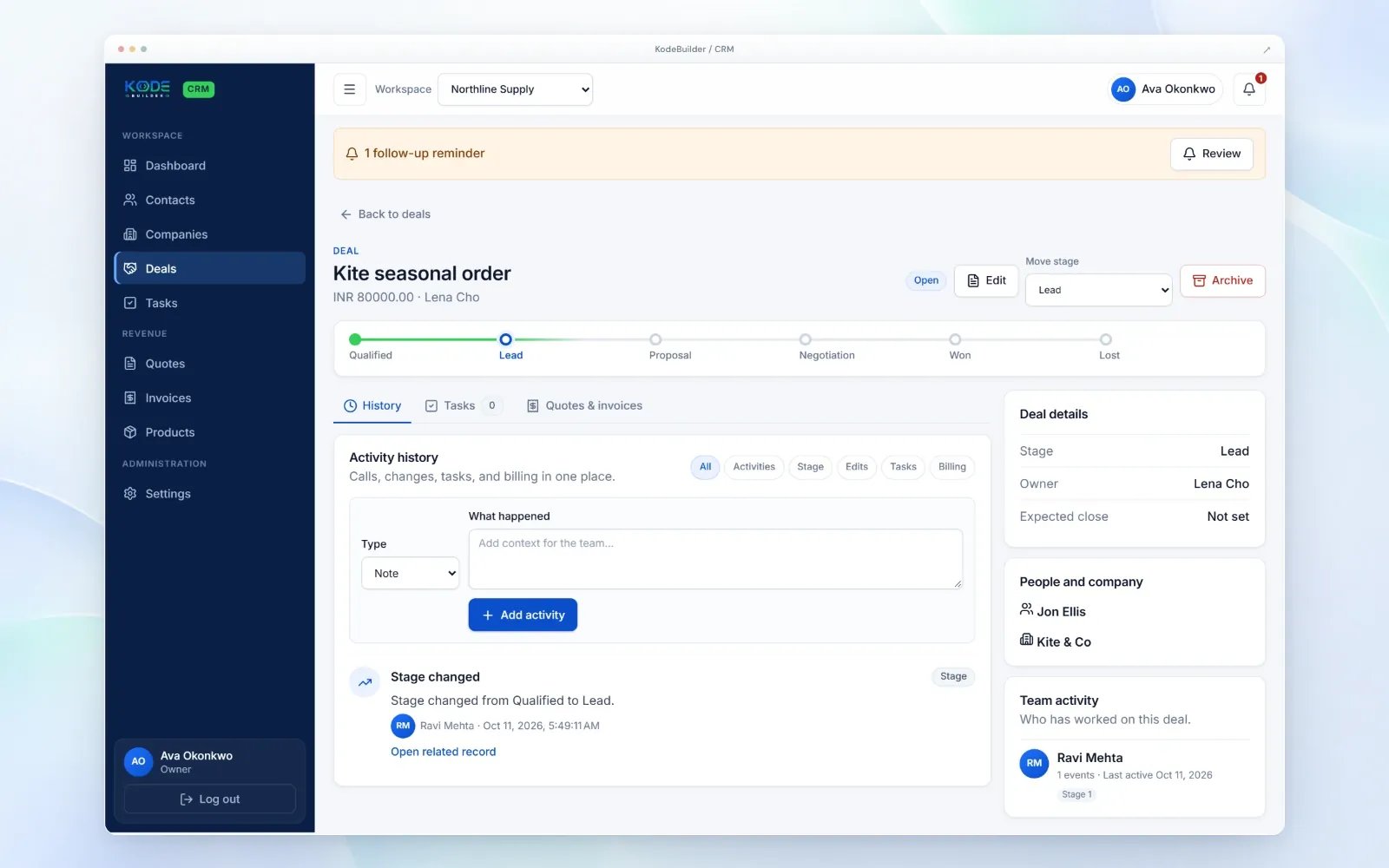
Deal workspace: history, tasks, quotes and invoices
Each deal has its own page with the stage tracker, value, owner, expected close date and the people and company involved. The activity history keeps calls, notes, stage changes, edits, tasks and billing together, with filters for each, and anyone on the team can add what happened. Tasks and quotes and invoices sit in tabs on the same deal, and a team activity panel shows who has worked on it.
Mobile CRM app for sales on the move
Field sales and owner-led teams rarely sit at a desk all day. The KodeBuilder CRM mobile app gives them the same deals, stages, notes and reminders on their phone: open a deal before a meeting, move it to the next stage afterwards, add a note about what was agreed and check which follow-ups are due. Everything syncs with the desktop workspace.
Contacts, companies, products and workspaces
Contacts and companies hold your customer relationships and conversations. Products keep what you sell in one list for quotes and invoices. If you run more than one business or brand, each can have its own workspace, and you switch between them from the top bar.
Who it is for
- Small businesses that have outgrown a spreadsheet of leads and want an affordable CRM with a free plan to start.
- Field sales and mobile sales teams that need a CRM with a mobile app, not a desktop-only tool.
- Suppliers, distributors and B2B sellers that quote, invoice and sell in more than one currency.
- Consultants, agencies and service businesses that follow up on proposals and want every conversation in one place.
Brands that take repeat orders from dealers and retailers should also look at Dealer Portal. See all KodeBuilder products.
Pricing and access
A free plan is available. Paid plans are quoted after a short demo, based on the number of users and workspaces and the integrations you need. You request a demo, and the team reviews the details before your workspace is activated. KodeBuilder CRM is offered in India, the United States, Canada, the United Kingdom and Australia.
Run your sales on KodeBuilder CRM
You manage contacts, deals, follow-ups, quotes and invoices after access is approved.
We build it for you
Custom stages, integrations with your systems or a fully custom CRM is scoped as a project.
Frequently asked questions
KodeBuilder CRM is a CRM for small business sales teams. It keeps contacts, companies, deals, tasks, quotes and invoices in one workspace, with a sales pipeline by stage and follow-up reminders, on desktop and in a mobile app.
Yes. Sales staff can open deals, move them between stages, add notes and review follow-ups from their phone, using the same data as the desktop workspace.
Deals move through Qualified, Lead, Proposal, Negotiation, Won and Lost. The pipeline shows as a board or a list, and it can be exported.
Yes. Deal values keep their own currency, such as INR or USD, and pipeline totals are shown per currency instead of being added together.
Yes. Quotes and invoices have their own sections and also appear on the deal, next to its activity history and tasks.
A free plan is available. Paid plans are quoted after a short demo, based on the number of users and workspaces and the integrations you need.
Request a demo
Tell us about your sales team. We show you KodeBuilder CRM and review the details before activation.